
HITS manages inventory quantities by store for all stocking goods added to the system. Inventory quantities are not maintained for non-stocking goods (often referred to as outside purchases).
The following is an explanation of the different inventory quantities referenced in HITS.
True qty – True quantity are inventory counts reflected only by closed tickets (sales, receiving, transfers, and adjustments). If the system show True qty=4 tires of a specific SKU, and those tires are added to a Workorder, the True qty will not change until the Workorder is finalized closed. True quantities are most often represented on reports.
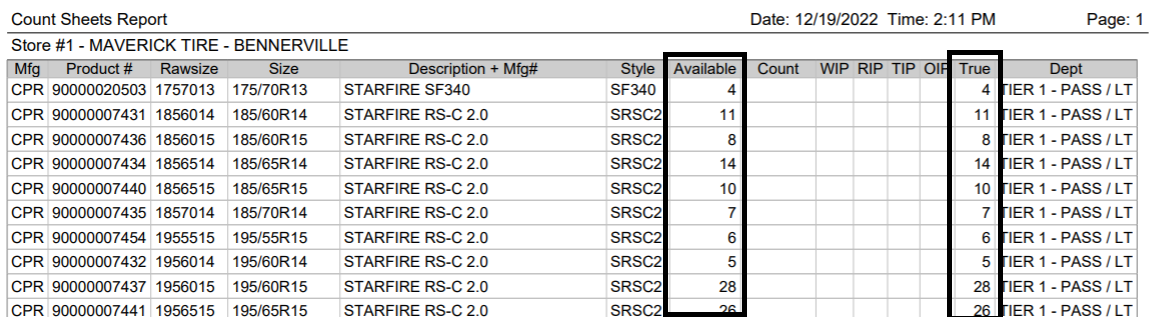
Example: Both Available and True shown on this Count Sheet report.
Available qty – Available quantity are the inventory counts reflected by closed and open tickets (sales, receiving, transfer, and adjustments). If the you have 4 tires of a specific SKU in your physical inventory and add these tires to a Workorder, Available qty = 0. Most quantities that display in the system are the available quantities, hence the importance to void or close open tickets that are not actual transactions.
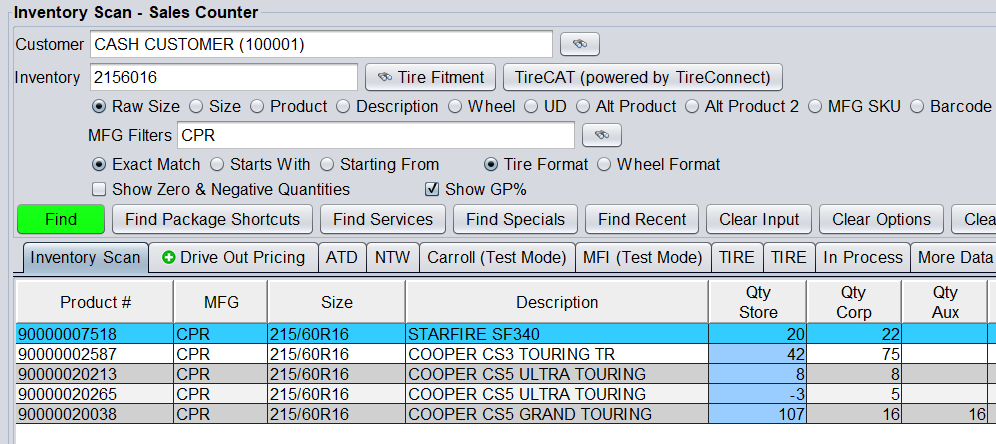
Most quantities shown in the system reflect Available qty.
WIP – Work In Process quantities reflect the quantities that exist on open Workorders. For users running in Batch Mode, Batch tickets are counted under WIP until finalized closed. Quotes are not counted in WIP and do not affect Available.
RIP – Receipt In Process quantities reflect the quantities that exist on open Receipts. Adjustment tickets are also counted as Receipts, and will be counted under RIP.
TIP – Transfers In Process quantities reflect the quantities that exist on open Transfers. TIPs will affect inventory based on the transfer type. INBOUND TIPs will increase available quantity, OUTBOUND TIPs will decrease available quantity.
OIP – Orders In Process quantities reflect the quantities that exist on open Purchase Orders. OIP does not affect available quantity, but are subtracted out of suggested reorder when building restocking purchase orders.
Available Qty = True Qty – WIP + RIP + INBOUND TIP – OUTBOUND TIP
Corporate Available – For multi-store users, Corporate Available is the SUM of all stores’ Available Qty
Corporate True – For multi-store users, Corporate True is the SUM of all stores’ True Qty
Aux – Is a static inventory bucket that is unaffected by tickets, but can be uploaded or updated from supplier integrations. For example, this field may be populated with quantities available from NAPA.