
The Create Follow-Up Ticket feature allows shops to automatically generate a follow-up ticket when closing an invoice. This is most commonly used by in-house technicians or staff to track courtesy follow-ups, internal reminders, or issues that need to be revisited after the original service is completed.
The follow-up ticket is created as a QUOTE, contains reference comments back to the original invoice, and includes a configurable follow-up date.
Important Notes
- This feature is not enabled by default
- It must be enabled per location through Store / Corporate settings
- The default follow-up timing (commonly ~10 days) can be configured by location
How to Create a Follow-Up Ticket
When the Create Follow-Up Ticket option is available on the ticket close screen, users can create a follow-up ticket directly from the ticket close process.
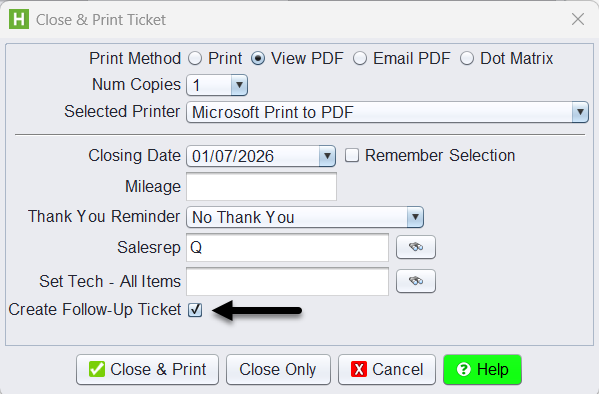
1.) In the Close & Print Ticket window, check the box for Create Follow-Up Ticket.
What Happens When “Create Follow-Up Ticket” Is Used
When the option is selected at Close & Print Ticket:
- A new follow-up ticket is created automatically
- The follow-up ticket is:
- Entered as a QUOTE (no charges by default)
- Linked to the original invoice
- Pre-filled with courtesy follow-up reference comments, including:
- Original invoice number
- Original invoice date
- A follow-up date is assigned:
- Defaults to the number of days defined in system settings (commonly ~10 days)
- Can be adjusted at the time of follow-up ticket creation
- By selecting a specific date, or
- By using days-out logic
This allows the original invoice to remain closed while still providing a trackable follow-up record.