
The Copy Cell to Clipboard feature allows users to quickly copy the contents of a single cell within a grid directly to their clipboard. This eliminates the need to remember specific data such as customer numbers or ticket numbers when completing searches in HITS.
This option is available in most HITS data grids and reports where right-click menus are supported.
How to Copy a Cell Value
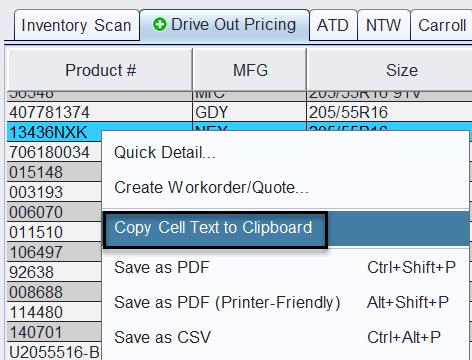
1.) Highlight the row containing the value you want to copy.
2.) Right-click in the specific cell containing the information you wish to copy.
3.) Select Copy cell text to clipboard from the menu.
4.) The cell value is immediately copied to your clipboard.
You can now paste the value into a search field in HITS or another application such as Excel, email, or notes.
Where You Might Use This
This feature is helpful when working with:
- Invoice numbers
- Customer account numbers
- Product numbers or SKUs
- Dollar amounts from reports
- Any single data value in a table