
In HITS, salesrep codes are used to track sales, by invoice, items sold, or by rep assigned to customer’s accounts. Typically, salesrep codes are added to a Quote or Workorder, but can also be added to Receipt, Purchase Order, Transfer, or Adjustment.
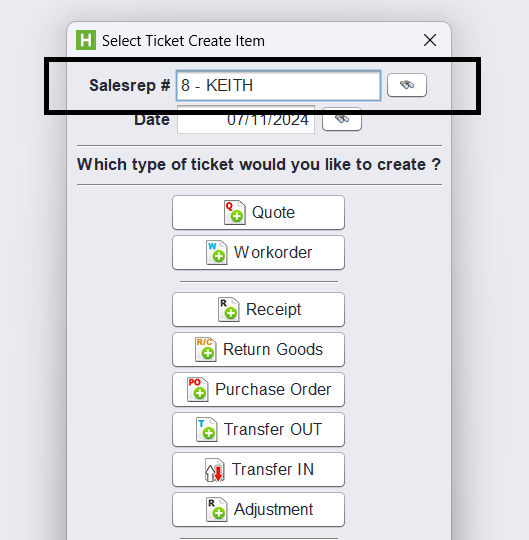
How to setup salesreps in the system
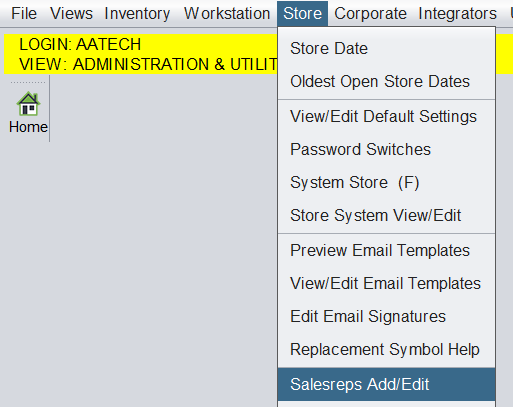
To add Salesreps into the system, go to View > Admin & Utilities > Store > Salesrep Add/Edit
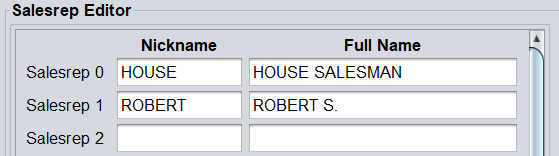
On the screen enter the Salesreps Nickname and Full Name.
The Nickname will show on the screen, the Full Name will print on the customer’s invoice. Click Save when done. Please be sure to Log Out/In for the changes to take effect.
Frequently Asked Questions
What is the difference of Salesrep & Technician in HITS?
Salesrep is generally who made the sale. Technician is who performed the work. If an employee sells as well as performs the work, they will need to be added to both the Salesrep table, as well as the Technician table.
What if a Salesrep works in multiple stores?
Salesreps are saved in HITS by store, so if a Salesrep sells in multiple stores, they will need to be added to each store.
How do I run reports on Salesreps?
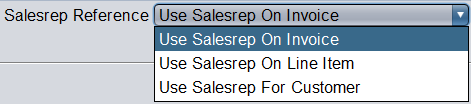
Salesrep is an option on many reports. Many reports allow you to run reports based on the Salesreps on the invoice, the Salesrep on the Line Item, or the Salesrep assigned to the customer’s account.
Typical salesrep reports are the Salesrep Journal, Salesrep Sales- By Customer, and the Salesrep Recap. Additionally, many reports provide subtotaling or filtering by salesrep.
Default Salesreps on Workstation
If the a Salesrep works on a dedicated workstation, the default salesrep for the workstation by going to Views > Administration & Utilities > Workstation > Set Default Salesrep.
This will prevent the user from needing to enter the salesrep code every time they start a ticket.
