
What is AutoOps?

AutoOps is an online scheduling tool that integrates directly with HITS Software. With AutoOps, your customers can book service appointments online — anytime, day or night. Once an appointment is scheduled, it automatically appears in HITS, eliminating the need for manual entry.
Benefits of Using AutoOps with HITS
-
- Customers can self-schedule appointments 24/7
- Appointments flow automatically into HITS
- Reduces phone calls and manual work for your staff
- Creates a smoother scheduling experience for customers
How to Get Started
Have an AutoOps account?
Submit an HITS AutoOps Setup Request:
Don’t have an AutoOps Account?
Step 1: Setup your AutoOps Account
-
- Go to AutoOps.com and set up your AutoOps account.
-
- Once your AutoOps account is setup, return to submit your HITS AutoOps Setup Request form.
✅ After setup is complete, your customers will be able to book appointments online through AutoOps, and those appointments will appear automatically in HITS.
Appoints will appear in the Notifications window and contain the AutoOps Appointment in the appointment description screen.

If the customer has an existing account in the system (matched by phone number or email address) the quote will be created with the appointment time requested.

If the Customer does NOT exist in the system, the quote will be created with the Temporary customer and the new customer will need to be created. The appointment details will be listed on the ticket as comments and the date and time will be recorded on the Appointments/Status tab.

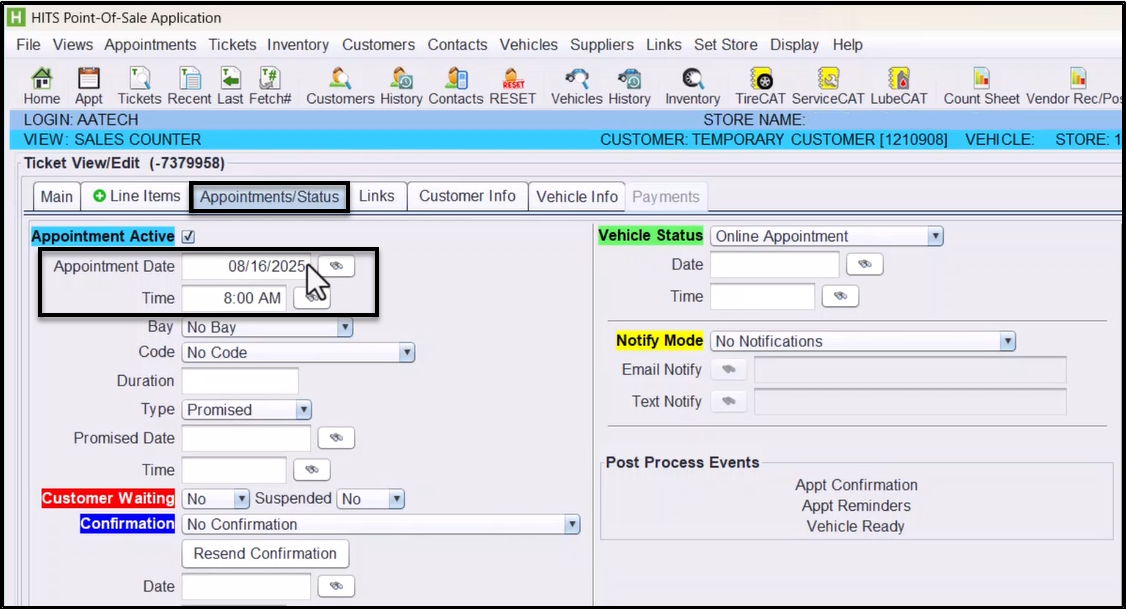
Select Convert at the bottom to convert the quote to a workorder once the customer has been created, the vehicle added, and the work is ready to begin.
