
On a properly sized display, the HITS POS application should be easy to read and should not contain any scroll bars.
The recommneded screen resolution for workstations running the HITS POS application is 1920 x 1080 or higher.

If you are attempting to make the screen easier to read or fit better on your screen, there are two settings in the application that can be modified.
Display > Look & Feel allows you to change the application Theme. The default theme is Nimbus, but the Metal theme can work better on small monitors.
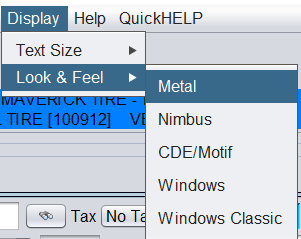
Display > Text Size allows you to change the text size in the application. XL is the default size but larger sizes may be easier to read, and smaller sizes may work better on smaller monitors.
