
A parts matrix is used to automatically calculate the selling price of a part based on the part’s cost.
In HITS, these are often used for outside parts with product codes such as OPP (Outside Purchase Parts); OPT (Outside Purchase Tires); OPW (Outside Purchase Wheels); and OPD (Outside Purchase Dealership Parts). You can also create your own outside part codes.
To edit the outside parts matrix go to:
1. Views > Admin & Utilities > Inventory > Inventory Add/Edit Delete
2. Enter the Product # you are editing (and TAB or ENTER) to find the product.
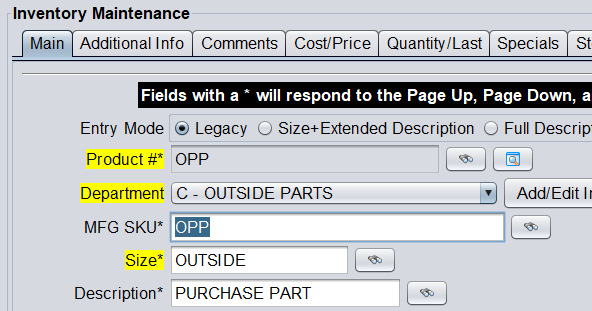
3. Go the Cost/ Price tab to edit the pricing.
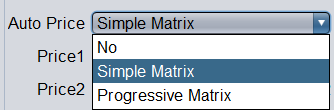
4. To activate a matrix, make sure Auto Price is set to either Simple Matrix or Progressive Matrix.
5. Proceed to enter your cost breaks and factors.
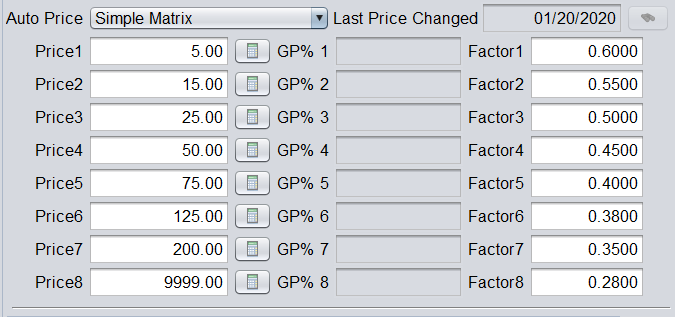
Factors 0.00 – 0.99 are used for Gross Profit
Factors 1.00 – 1.99 are used for Markup (if adding a markup more than 99%, you may need to convert the Markup percentage to Gross Profit percentage)
Factors 2.00 – 99.99 are used for Dollar Adder
6. You can also add a Round To amount to round all prices.

7. Click Save to save changes to your parts matrix.