
The IP Journal (In Process Journal) report lists all open tickets that are affecting available inventory quantities.
Use this report to find products that are tied up on:
- Open workorders
- Open receipts
- Open transfers
- Open purchase orders
Reviewing this report helps ensure that in-process tickets are properly closed and not impacting available quantities, which could otherwise cause inaccurate values to appear on the Inventory Lookup screen in HITS.
Recommended Use:
Run the IP Journal at least once a year, especially before major inventory price updates, physical counts, or year-end adjustments. It can also be used any time you need to confirm that in-process inventory is cleaned up.
How to Run the IP Journal
Follow the steps below to generate the report:
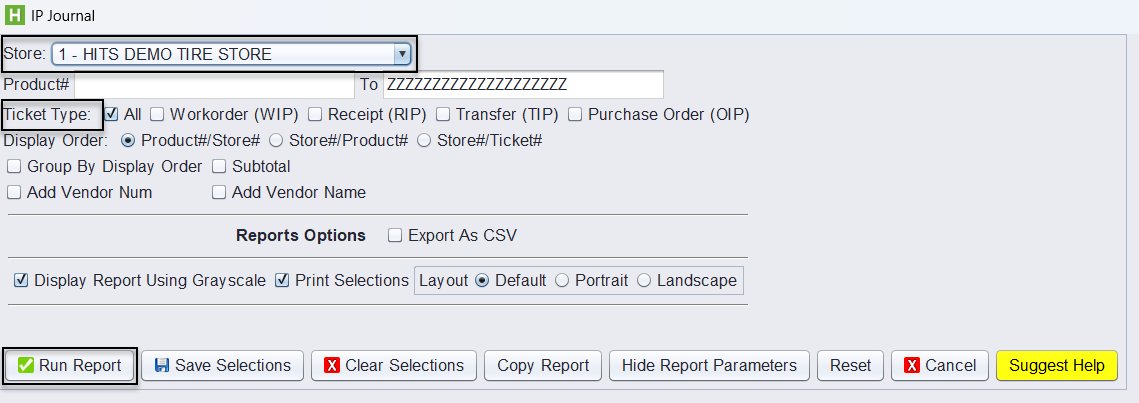
1.) Navigate to Views → Reports.
2.) Go to Journals → IP Journal.
3.) Select the Store you want to run the report for.
4.) (Optional) Narrow the results by entering a Product # range, or leave the default values to include all items.
5.) Choose the Ticket Type(s) you want included, or leave the default selection of All(default).
- WIP – Workorder in Process
- RIP – Receipt in Process
- TIP – Transfer in Process
- OIP – Open Purchase Order
6.) (Optional) Adjust the Display Order (e.g., Product# → Store#, Store# → Ticket#, etc.).
7.) Click Run Report to generate the results.
Understanding the Report Layout
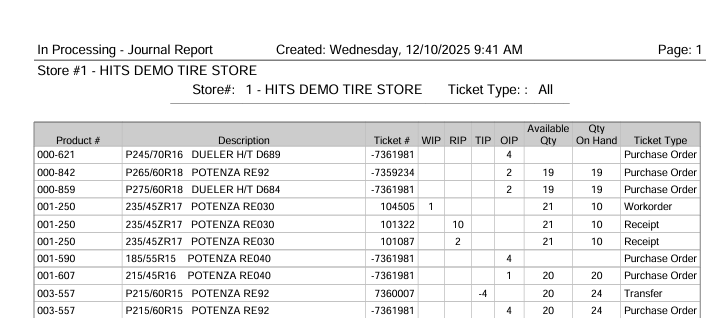
Each row represents a product that is currently involved in one or more open transactions. The following key columns appear on the report:
- Product # – SKU or MSPN for the item.
- Description – Product description.
- Ticket # – The associated open ticket number.
- WIP / RIP / TIP / OIP – Quantity of the product tied to each in-process category.
- Available Qty – Expected available stock after considering in-process amounts.
- Qty On Hand – Current true inventory which does NOT consider in-process transactions.
- Ticket Type – Indicates whether the line came from a Workorder, Receipt, Transfer, or Purchase Order.
When to Use the IP Journal
The IP Journal is helpful when:
- Stock appears short or unavailable despite expected on-hand quantities.
- Items are tied up on open workorders.
- Receipts or transfers seem incomplete or stalled.
- Purchase orders have not been fully posted.
- Inventory variances need to be reconciled.
- A daily review of tickets that were missed during processing and left open.
Running this report gives clear visibility into where inventory is currently allocated before it reaches a final posted state.