Adding Quick Launch Websites to HITS®
You can easily add your favorite websites and launch them directly from HITS BPOS as needed. Want to have Napaonline or ATD easily accessible? It is simple. You can even add Google or a link to the Weather Channel. Please note that all links are universal so whatever you add, all other users will also see as options as well.
1. Click on Links –> Edit Supplier Links
2. Right click anywhere on the supplier links and then select Add Link
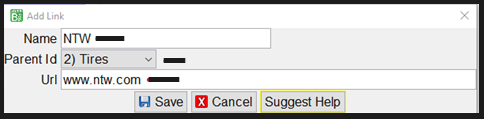
3. Add the Name you would like to see displayed on the drop-down menu
4. From the Parent ID drop-down, select the Group you would like to add your new link under
5. Add the website address to the URL field and then click Save:
6. If you would like add your own group, you can right-click and select Add Group. Please note that if you want it to be numbered like the other groups, you will want to add the number as part of the Group name, see example below:

7. You can also edit the links and groups as needed. Just right-click on the link or group you wish to edit and select the option to Edit Link or Group.
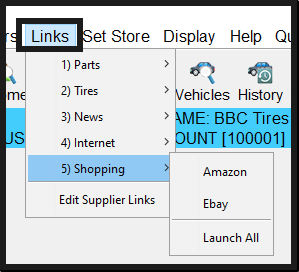
After you’ve made your additions and edits, you can then start using your Links drop-down menu to launch your websites: