
HITS can print oil change stickers for VSOC tickets when using a GoDex RT700i-Pro printer using the 4” oil change sticker format shown below.

What is required to activate this feature:
1. Advise HITS Software Support to load the oil change print configuration file to your system and activate oil change sticker printing.
2. Mileage & Date Intervals must be entered for each OIL in the inventory file.
(Views > Administration > Inventory Add/Edit > Additional Info tab)
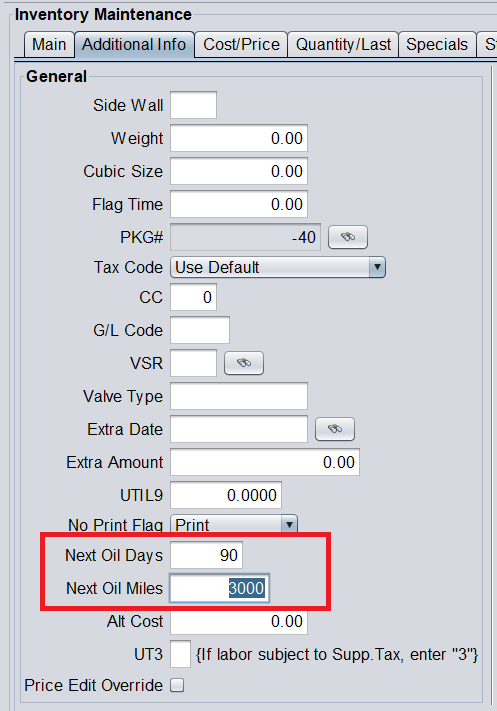
3. Mileage must be entered on the Workorder.
The sticker will print the Workorder Mileage + Next Oil Miles. There is nothing the Service Advisor needs to enter. Mileage currently cannot be overwritten by the Service Advisor.
If you prefer to have the vehicles current mileage (today’s mileage) print simply leave the Next Oil Miles field blank:
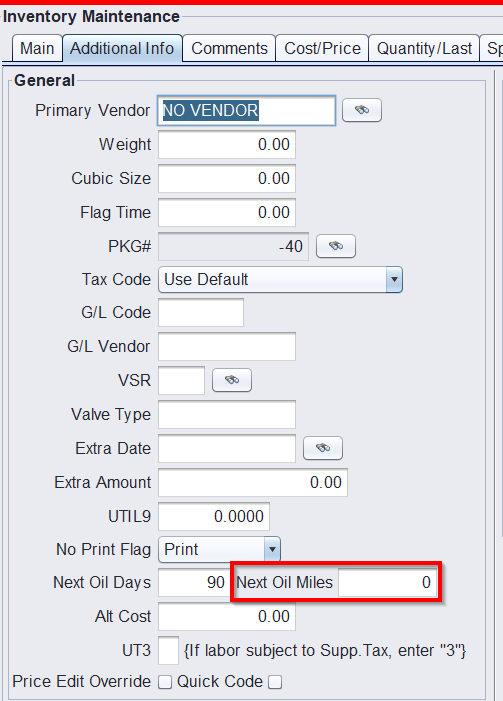
The Workorder will show the Oil Decal Mile and Days that will print. These values will NOT print on the customer’s Workorder.

4. You can optionally print 4 lines of text on the oil change sticker under the logo. (See image at the beginning of this document). These line can be configured in Views > Admin & Utilities > Store > View Edit Default Settings > ServiceCAT/ EPICOR > Oil Decal Printing
