
The Sales Transactions reports are essential year-end tools used to verify revenue activity, reconcile sales totals, validate taxable and non-taxable transactions, and ensure accuracy across invoices, departments, product categories, and technicians.
HITS provides two versions of the report:
-
- Sales Transactions (PDF) — a readable summary or detail report for daily/monthly/year-end review.
- Sales Transactions CSV Extract — a full-detail export with additional columns for accounting and audit work.
Both use the same filters, but the output format and available columns differ.
Navigation Path
Views→ Reports→ Sales & Corporate → Sales Transactions
Views→ Reports→ Sales & Corporate → Sales Transactions CSV Extract
Recommended Use
Sales Transactions PDF (Summary + Detail)
Use the PDF version for reviewing year-end revenue totals, taxable vs. non-taxable sales, department performance, technician/labor distribution, and identifying unusual or manually entered items. Summary Mode provides high-level totals, while Detail Mode confirms the accuracy of each individual line item.
Sales Transactions CSV Extract
Use the CSV Extract for full year-end reconciliation, exporting all invoice line items for financial review, margin analysis, pivot tables, and identifying discrepancies with external accounting systems. It contains additional fields not shown in the PDF and is the preferred format for accountants and auditors.
Important: The CSV Extract includes additional fields not shown on the PDF version and is the preferred format for year-end accounting review.
How to Run the PDF Report
Step 1 — PDF Summary (Summarized Totals)
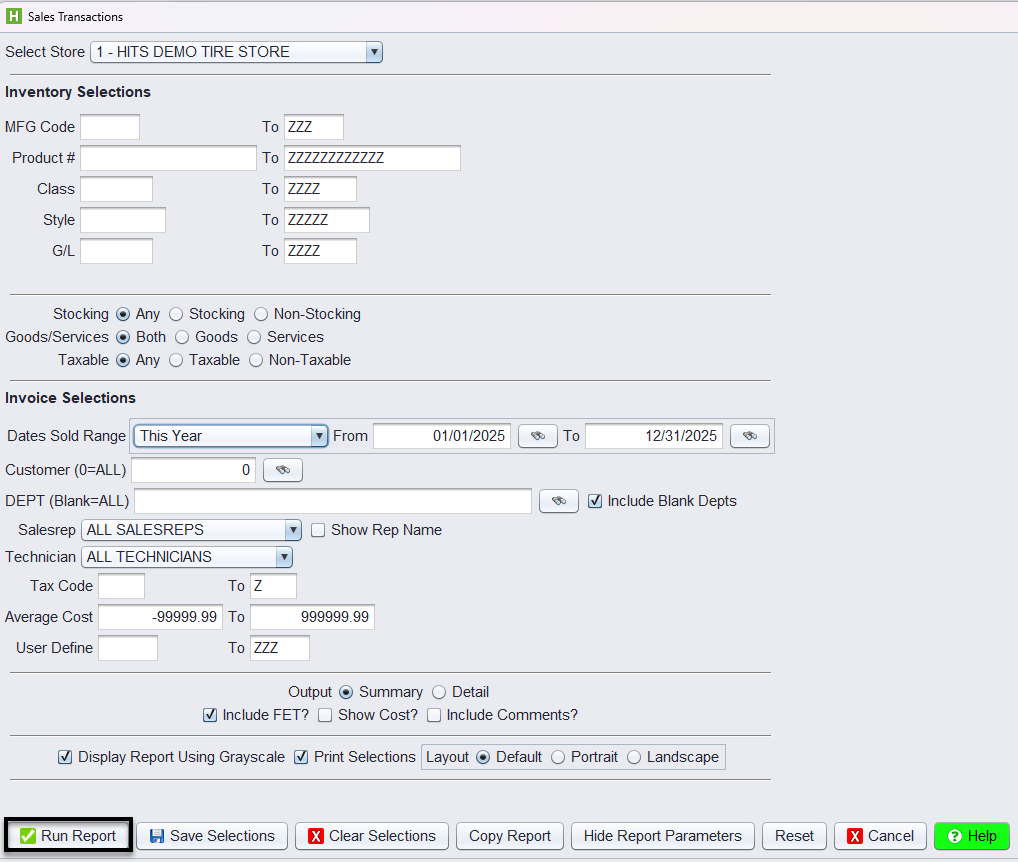
1.) Navigate to Sales & Corporate → Sales Transactions
2.) Set the date range (1/1–12/31)
3.) Choose Summary output
4.) Enable Include FET if applicable
5.) Run the report and save/print for year-end package
Step 2 — PDF Detail (for spot-checking)
1.) Change output to Detail
2.) Run the report again
3.) Use this version to:
-
- Confirm invoice activity
- Validate charges
- Review department and technician lines
How to Run the CSV Extract
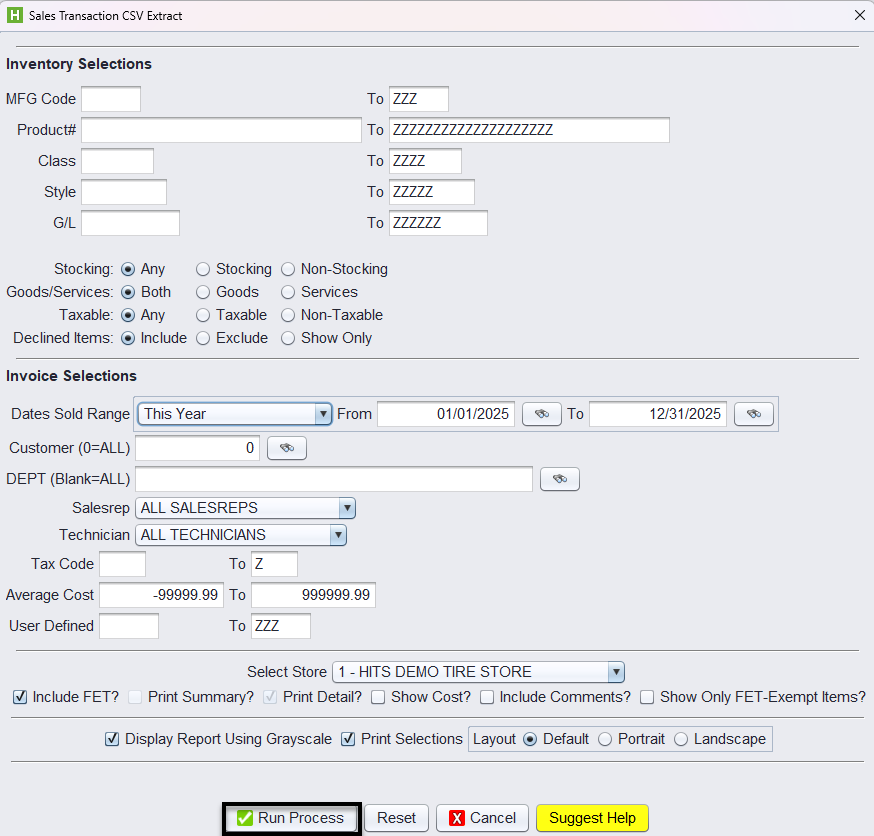
1.) Navigate to Sales Transactions CSV Extract.
2.) Apply the same filters used in the Sales Transactions report:
-
-
Date range
-
Product, Class, Style, or G/L filters
-
Customer, Salesrep, Technician, Department
-
3.) Choose optional output flags:
-
-
Include FET?
-
Show Cost?
-
Include Comments?
-
Print Detail? (usually ON for this export)
-
4.) Click Run Process to download the CSV file.
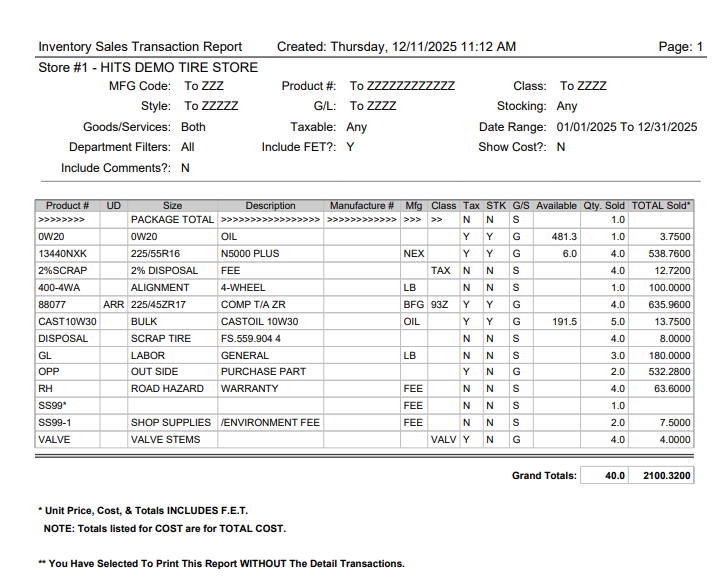
PDF Summary Mode
Provides year-end totals for:
-
- Quantity sold
- Total revenue
- Tax flags
- Stocking indicators
- Revenue by product and department
- Includes F.E.T.
Summary Mode is used to verify that year-end revenue is categorized correctly.
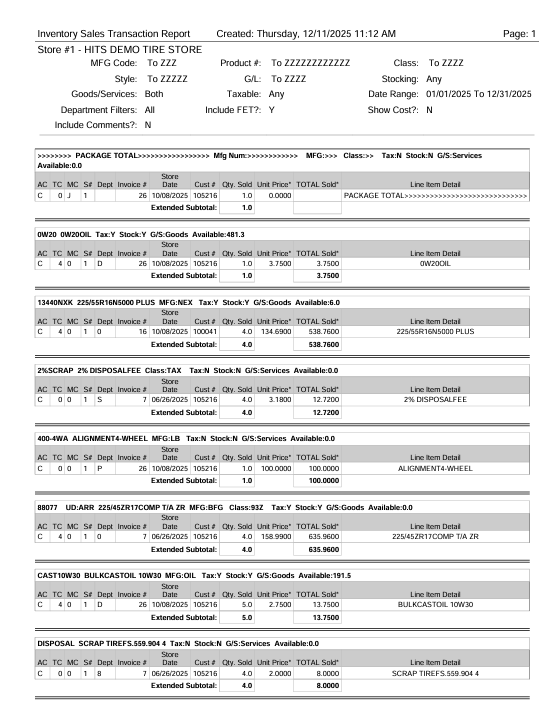
PDF Detail Mode
Shows each invoice line including:
-
- Invoice # and date
- Product #, description, class
- Qty sold
- Unit price and extended price
- Taxability
- Technician / Salesrep
- Department assigned
- Includes F.E.T.
Detail Mode supports:
-
- Internal audits
- Revenue mismatch investigations
- Identifying misclassified charges
CSV Extract
The CSV version includes all underlying sales data fields, including many columns not shown in the PDF Summary or Detail reports. This export provides additional transaction-level details such as:
-
- Invoice-level and line-level identifiers
- Extended cost, margins, and variance fields
- FET amounts and exemption indicators
- Taxability flags and tax codes
- Technician and salesrep assignments
- Product attributes including class, G/L coding, UD fields, and other internal metadata
- Customer and vehicle information captured at the time of sale
- Declined services and related amounts (if applicable)
Because it contains the complete set of invoice line data, the CSV Extract is the preferred year-end file for accountants, auditors, and financial analysis.
