
HITS BPOS allows you to change settings and behaviors for a number of screens in HITS BPOS. While we won’t review every single option here, we will give an overview of the various options and go over where and how to change your system defaults.
Once you are in your Views>Administration & Utilities>Store>View/Edit Default Settings screen, you will see a list of all the various areas in HITS BPOS in which you are allowed to make edits listed down the left-hand side of your screen. You can edit everything from your Invoice screen to your Drive Out Pricing options to how the Customer/Vehicle Lookup screens return data. There are also defaults for Receiving functions, Bookkeeping functions, and some 3rd-party integrations.
To Edit Settings:
1.) Click on Views → Administration & Utilities → System → View/Edit Default Settings
2.) Select the Category you wish to edit from the options on the left-hand side of the screen:
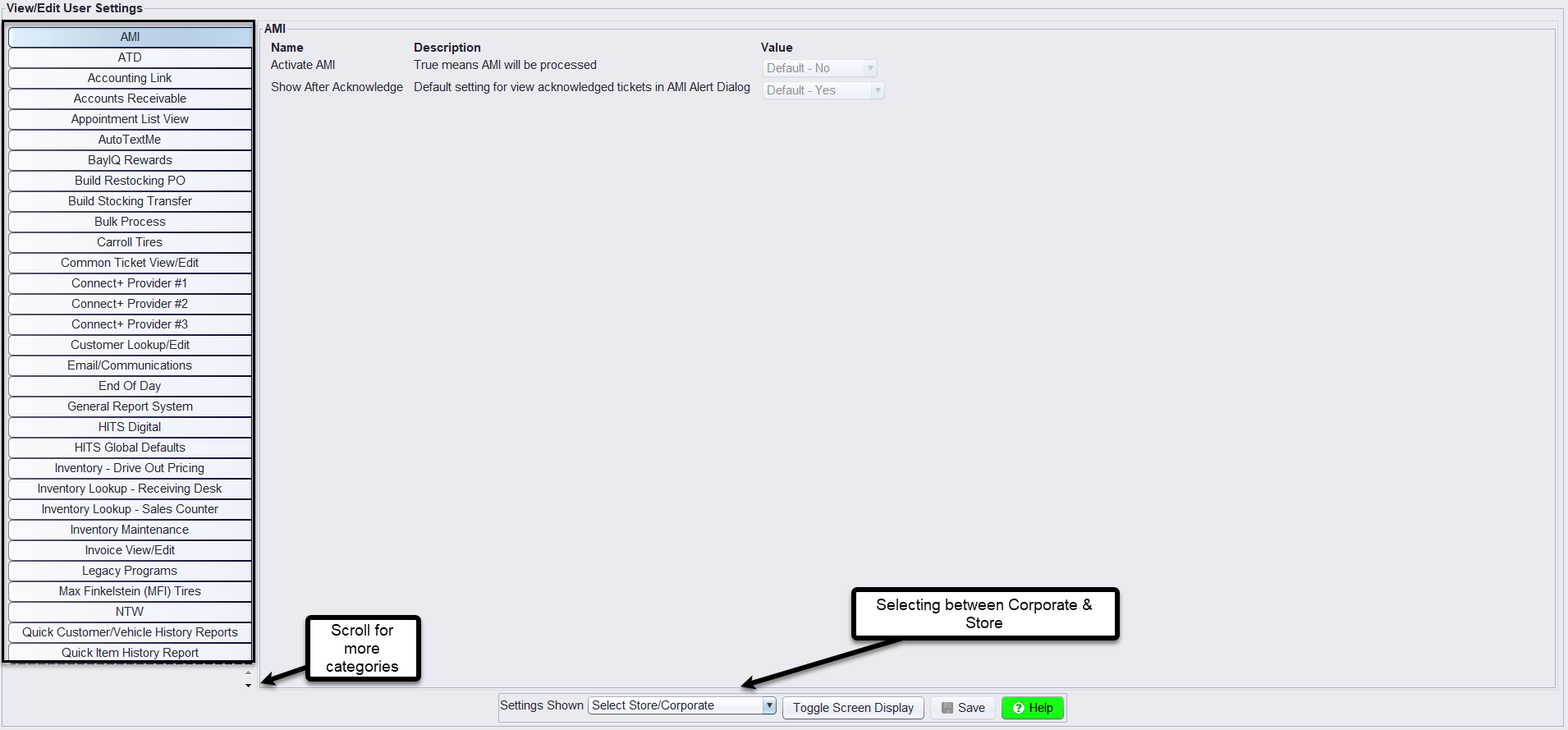
3.) Select the appropriate store location from the Settings Shown drop-down menu at the bottom of the screen. You can set default settings for Corporate which affects all locations or you can set options for each individual location. (Please note that store settings override Corporate settings. In other words, you can set the Corporate Inventory Lookup screen to always display out-of-stock and negative inventory items. However, someone with password permission could edit store #2 to only show what is in stock, which overrides the corporate setting for that store’s location only.)
4.) Make your changes
5.) Click Save at the bottom of the screen. Everyone will need to log out and back in to recognize those changes.
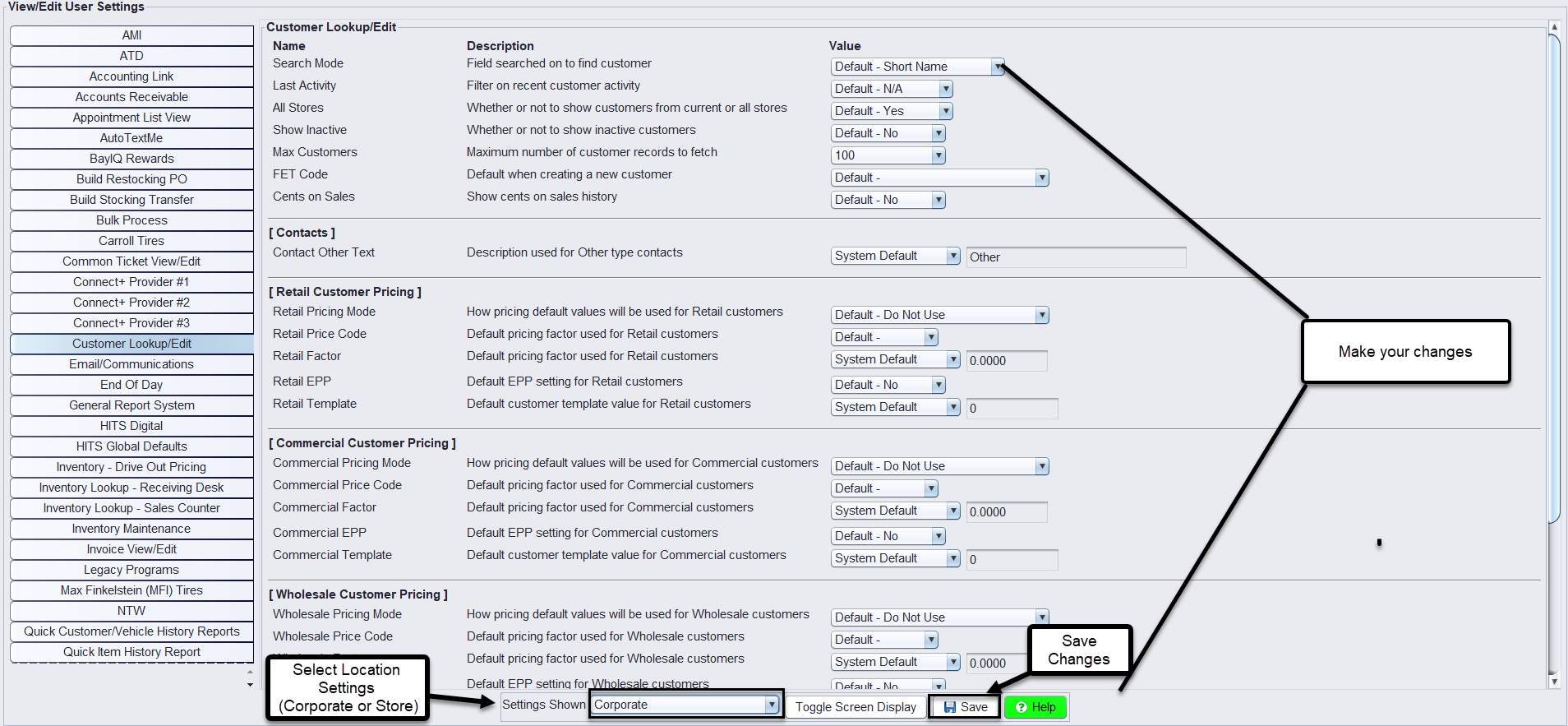
The table below lists the tabs available in these settings to help you locate the specific setting you need to modify. It is not an exhaustive list of all settings.
| Tab | Description |
|---|---|
| AMI | Settings related to the integration with AMI (Automotive Management Institute) |
| Accounting Link | Configuration options for connecting HITS BPOS to external accounting systems. |
| Accounts Receivable | Default settings for managing customer invoices, payments, and outstanding balances. |
| Appointment List View | Settings for how appointment lists are displayed and managed in HITS BPOS. |
| AutoTextMe | Configuration for automated texting services |
| BayIQ Rewards | Settings related to BayIQ rewards integration, including customer enrollment and rewards tracking. |
| Build Restocking PO | Options for creating restocking purchase orders based on inventory levels and sales data. |
| Build Stocking Transfer | Settings for generating transfer orders between store locations to balance inventory. |
| Bulk Process | Configuration for processing multiple transactions or updates in bulk, such as invoicing or inventory adjustments. |
| Carroll Tires | Integration settings for working with Carroll Tires, including inventory and order processing. |
| Common Ticket View/Edit | Default settings for viewing and editing service tickets across the store. |
| Connect+ Provider #1 | Configuration settings for the first external provider connected to HITS BPOS through the Connect+ system. |
| Connect+ Provider #2 | Configuration settings for the second external provider connected to HITS BPOS through the Connect+ system. |
| Connect+ Provider #3 | Configuration settings for the third external provider connected to HITS BPOS through the Connect+ system. |
| Customer Lookup/Edit | Default options for searching, viewing, and editing customer information. |
| Email/Communications | Settings related to email notifications and communication templates sent from HITS BPOS. |
| End of Day | Configuration for closing procedures, including daily reconciliations and reports. |
| General Report System | Options for generating and customizing reports across various modules within HITS BPOS. |
| HITS Digital | Settings specific to the digital version of HITS, including mobile access and digital workflows. |
| HITS Global Defaults | Global settings that affect all stores, providing a baseline for other customizable settings. |
| Inventory - Drive Out Pricing | Default pricing settings for inventory items at the point of vehicle delivery. |
| Inventory Lookup - Receiving Desk | Configuration for how inventory data is displayed and managed at the receiving desk. |
| Inventory Lookup - Sales Counter | Options for inventory searches and display settings at the sales counter. |
| Inventory Maintenance | Default settings for inventory management tasks, including stock adjustments and categorization. |
| Invoice View/Edit | Configuration for how invoices are viewed and edited within the system. |
| Legacy Programs | Settings related to older, possibly deprecated programs still in use by some stores. |
| Max Finkelstein (MFI) Tires | Integration settings for Max Finkelstein (MFI) Tires, including inventory and order management. |
| NTW | Configuration options for integration with National Tire Wholesale (NTW), including order processing and inventory syncing. |
| Quick Customer/Vehicle History Reports | Settings for generating quick reports on customer or vehicle history. |
| Quick Item History Report | Options for generating quick reports on the history of specific inventory items. |
| Quick Vendor History Reports | Settings for quickly generating reports on vendor transaction history. |
| ROA Creation, View, & Edit | Configuration for creating, viewing, and editing Receipts on Account (ROA). |
| ROA Ticket Print | Settings for printing ROA tickets, including layout and information included. |
| RT Systems | Integration settings for RT Systems, possibly related to point-of-sale or inventory management. |
| Receiving View/Edit | Configuration for viewing and editing receiving tickets and related inventory information. |
| ServiceCAT/Epicor | Integration settings for ServiceCAT/Epicor catalogs, enabling part lookup and order processing. |
| Store Date Creation Rules | Rules for how store-specific dates are generated and managed within the system. |
| Ticket Lookup - All for Customer or Vehicle | Default search settings for looking up all tickets related to a specific customer or vehicle. |
| Ticket Lookup - Invoice | Settings for how invoice tickets are searched and displayed. |
| Ticket Lookup - ROA | Configuration for searching and displaying ROA-related tickets. |
| Ticket Lookup - Receiving | Settings for searching and displaying tickets related to inventory receiving. |
| Ticket Lookup - Returned Goods | Options for looking up and managing tickets for returned goods. |
| Tire Connect | Integration settings for Tire Connect, including order processing and inventory syncing. |
| Tirelink | Configuration for integration with Tirelink, focusing on tire inventory and order management. |
| Update Bin# | Settings for updating bin numbers in inventory management, ensuring accurate stock location tracking. |
| Vehicle Lookup/Edit | Default options for searching, viewing, and editing vehicle information. |